String Data Types In Details
👋 Hi there, I am Nirmal. I am a former software engineer with a keen interest in data science and analytics domains. Besides, I love to contribute to open source and help others to understand various tech stuffs.
In Python, a string is a sequence of characters that can be manipulated using various functions and methods.
Some of the main ways to manipulate strings:
Slicing:
Extracting a substring from a larger string by specifying a range of indices.
Basic syntax is : str[start:end:step]
  string = "Hello"
  string[1:4]  # "ell"
  #starting from position 1 to
  string[:4]   # "Hell"
  string[2:]   # "llo"
  string[:]    # "Hello"

  '''You can use negative indices to slice from the end, and specify
  a step to slice with a stride'''

  string = "Hello"
  string[-4:-1] # "ell"
  string[::-1]  # "olleH"
  string[::2]   # "Hlo"
String methods:
Useful functions to manipulate strings(lower(),upper(), split(), join(), replace(), find() )
string = 'Learn Python'
string.lower()  # returns 'learn python'
string.upper()  # returns 'LEARN PYTHON'

#string to list
string = 'Learn Python Programming'
print(string.split(' ')) # output =  ['Learn', 'Python', 'Programming']

#list to string
parts = ['Learn', 'Python', 'Programming']
string.join(parts) # output = 'Learn Python Programming'

string = 'Learn Python Programming'
string.replace('Python', 'Java') # output = 'Learn Java Programming'

string = 'Bitsnotion'.find('s')
print(abc)# output = 3
String formatting:
Integrate variables into strings.
Python offers various methods for string formatting:
The
f-strings(available in Python 3.6+)The
str.format()methodThe
%operator (deprecated in Python 3)
name = "Nirmal"
age = 23

print(f"Hello, my name is {name} and I'm {age} years old.")
print("Hello, my name is {} and I'm {} years old.".format(name, age))

# Both output =  "Hello, my name is Nirmal and I'm 23 years old."
Foat formatting options :
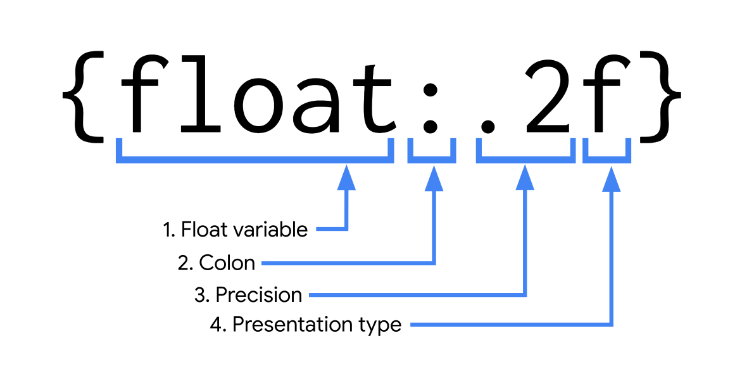
To use these options, build your expression within braces as follows:
The float variable is what’s being formatted
A colon (:) separates what’s being formatted from the syntax used to format it
. number indicates the desired precision
A letter indicates the presentation type
num = 1234.987123
print(f'{num:.2f}')#Output = 1234.99
Some others mostly used presentation types:
| Type | Meaning |
| 'e' | Scientific notation. For a given precision p, formats the number in scientific notation with the letter ‘e’ separating the coefficient from the exponent. The coefficient has one digit before and p digits after the decimal point, for a total of p + 1 significant digits. With no precision given, e uses a precision of 6 digits after the decimal point for float, and shows all coefficient digits for decimal. |
| 'f' | Fixed-point notation. For a given precision p, formats the number as a decimal number with exactly p digits following the decimal point. |
| '%' | Percentage. Multiplies the number by 100 and displays in fixed ('f') format, followed by a percent sign. |
num = 1000.987123
print(f'{num:.3e}')#Output = 1.001e+03

decimal = 0.2497856
print(f'{decimal:.4%}') #Output = 24.9786%
String concatenation:
Combine multiple strings using the + operator or .join() method.
string1 = "Hello"
string2 = "World!"

#method -1
print(string1 + string2) ## output = Hello World!
#method-2
string1 += string2
print(string1)  # output = Hello World!
#method-3
print("".join([string1, string2])) # HelloWorld!